Filezilla does not work on a Win2k machine due to the auto update feature. We need to turn this off to get it working.
Navigate to %APPDATA%\FileZilla, open filezilla.xml.
Search for code <Setting name="Update Check" type="number">1</Setting>
Change to code: 0
All should be well.
Dec 15, 2009


Dec 7, 2009
Sonicwall Registration Server Timeout
*Update: 12/9/09 - 3 days later, I was able to register the sonicwall*
I've been trying to register a new Sonicwall firewall installation, and their registration server has been down for over a day now, and this isn't the first time this has happened to me either. I was at a client's site with a new installation, and Sonicwalll's registration server took a nice long vacation. It was embarrassing to set up everything and then end up having to wait another day for their registration to come back to work! Tech support is futile, and outsourced, so they can't do anything to solve the problem.
Their hardware works well for me, but common Sonicwall, keep your site up! Thanks.
Dec 4, 2009


Google Public DNS: Day 1
 After setting up my router for Google Public DNS, I can say my Internet experience feels faster. Yeah, faster like a supercharged hamster on steroids running a 100 meter dash. Google DNS is "blazing fast" for me, and page loads are virtually instantaneous on my screen.
So for those who haven't tried this yet, I'll walk you through my experience with Google DNS to give you an idea of how it is to use their service:
I'll type www.ebay.com in Google Chrome. Press Enter. I blink. The page is loaded.
That pretty much sums it up...but seriously =), if you live relatively near a Google Data Center, your web experience may get a boost by using their DNS servers. Try it out, see if you like it, and if not, just switch back to your ISP's DNS servers, or hey, try out Open DNS.
P.S. Thank you Google for Gmail, Chrome, Blogger, Google payments, Video, Free phone calls using Google Voice, Calender, DNS, and last but not least, thank you in advance for the VOIP cell phone service coming in the future ; ).
Dec 3, 2009
Boxee Keyboard Shortcuts
Courtesy of DARKFiB3R on the boxee forums:
In Menus
\ = Full Screen (Enter, Exit)
S = Exit, Suspend
A = Library Status
H = Home
Home = Top of list
End = Bottom of list
Esc = Back
Enter = Enter
Arrows = Up, Down, Left, Right
In Playback
I = Toggle info
Y = Toggle info on CPU load and FPS
O = Toggle info
R = Rewind: 2X > 4X > 8X > Play (Space = Play)
P = Pause
[ = Skip back 10 mins
] = Skip Forward 10 mins
< = Previous track > = Next track
A = Library Status
S = Exit, Suspend
V = Toggle Home & Now Playing
F = Foward: 2X > 4X > 8X > 16X > 32X > Play (Space = Play)
X = Stop now playing
Space = Play, Pause
In Menus
\ = Full Screen (Enter, Exit)
S = Exit, Suspend
A = Library Status
H = Home
Home = Top of list
End = Bottom of list
Esc = Back
Enter = Enter
Arrows = Up, Down, Left, Right
In Playback
I = Toggle info
Y = Toggle info on CPU load and FPS
O = Toggle info
R = Rewind: 2X > 4X > 8X > Play (Space = Play)
P = Pause
[ = Skip back 10 mins
] = Skip Forward 10 mins
< = Previous track > = Next track
A = Library Status
S = Exit, Suspend
V = Toggle Home & Now Playing
F = Foward: 2X > 4X > 8X > 16X > 32X > Play (Space = Play)
X = Stop now playing
Space = Play, Pause
How to: Set up Google Public DNS
Possibly faster internet searches and better security, try taking a ride with Google Public DNS.
From google:
Need help on the phone?
Google's Tech Support
877-590-4367 U.S.
770-200-1201 outside the U.S.
My internet searches feel faster already.
Thank you Google, and enjoy!
Nov 30, 2009
Tutorial: Nvidia ION N330 + XBMC + VDPAU + 1080P w/sound over HDMI
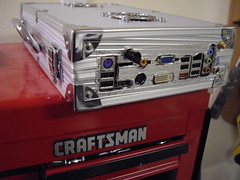
Alright guys and gals, I got around to updating my HTPC box over Thanksgiving weekend, and I can now say that the beta XBMC build looks mighty sexy when displayed in 1080P resolution. Also, DD, DTS passthrough, and Nav sounds are working 100% as well, including system sounds and Youtube in Firefox.
From reading the comments, in my previous post, it looks like the boxee instructions may not have worked 100% for some of you, my apologies, so I went ahead and did a fresh install to create new XBMC specific instructions for the following system:
Zotac Nvidia ION, Atom N330 Dual Core
2GB DDR RAM
Western Digital 150 GB Velociraptor
This will get you the 185 NVIDIA graphics drivers:
From what I read online, it looks like the newer 190 drivers may break HDMI sound? I'm using 185, and sound/graphics work beautifully.
Update Dec. 2nd, 2009: I'm now using 190.42 drivers without problems. Tested sound and video. Haven't tested passthrough on the 190.42 yet.
From what I read online, it looks like the newer 190 drivers may break HDMI sound? I'm using 185, and sound/graphics work beautifully.
Update Dec. 2nd, 2009: I'm now using 190.42 drivers without problems. Tested sound and video. Haven't tested passthrough on the 190.42 yet.
Update Dec. 3rd, 2009: Passthrough is working great. Suspend problems though with the 190.42 drivers. Ubuntu goes into suspend okay but no graphics or response upon resume.
Add these repositories to your sources:
deb http://ppa.launchpad.net/nvidia-vdpau/ppa/ubuntu karmic main
deb-src http://ppa.launchpad.net/nvidia-vdpau/ppa/ubuntu karmic main
Open up a terminal:
sudo apt-key adv --recv-keys --keyserver keyserver.ubuntu.com 71609D4D2F1518FA9C5DC0FB1DABDBB4CEC06767

sudo apt-get update

sudo apt-get install linux-headers-generic nvidia-glx-185

sudo reboot
Upon Rebooting go into the BIOS.
(the following instruction is from my memory, so if you dont' find it there, it's somewhere in your BIOS) In your BIOS, go to Southbridge configuration and change the video RAM from 256MB to 512MB. Inside the Southbridge config, change Audio codec to Internal only.
Open up another terminal (this will enable Youtube, and XBMC system sounds):
Type in: alsamixer
Make sure that IEC958 is unmuted by pressing the letter "m" without quotes.
If it it muted, then it will look like this - Item: IEC958 [off]
Once you unmute it, then it will look like this - Item: IEC958
Thanks to Greenhughes.com for the alsamixer tip.
This will get you sound/passthrough over HDMI:
(haven't tested coax or optical)
Boot into Ubuntu, and open up a terminal and type:
sudo gedit /etc/asoundrc.conf
Paste the following into that file:
pcm.dmixer {

type dmix

ipc_key 1024

ipc_key_add_uid false

ipc_perm 0660

slave {

pcm "hw:0,3"

rate 48000

channels 2

period_time 0

period_size 1024

buffer_time 0

buffer_size 4096

}

}


pcm.!default {

type plug

slave.pcm "dmixer"

}
Open up another terminal (this will enable Youtube, and XBMC system sounds):
Type in: alsamixer
Make sure that IEC958 is unmuted by pressing the letter "m" without quotes.
If it it muted, then it will look like this - Item: IEC958 [off]
Once you unmute it, then it will look like this - Item: IEC958
Thanks to Greenhughes.com for the alsamixer tip.
Save. Close it. Reboot.
Inside XBMC:
Go to Settings, Audio and change the following:
Instead of:
sound: Internal Codec HDMI
passthrough: ie958
Change to custom (type hdmi):
sound: hdmi
passthrough: hdmi
sound: hdmi
passthrough: hdmi
Now you will have HD video and sound in Ubuntu and XBMC from your HD videos all the way to SD youtube, hulu, or whatever you want to play. Now go have fun!
Subscribe to:
Posts (Atom)