Showing posts with label GoPRO HD. Show all posts

Mar 9, 2010

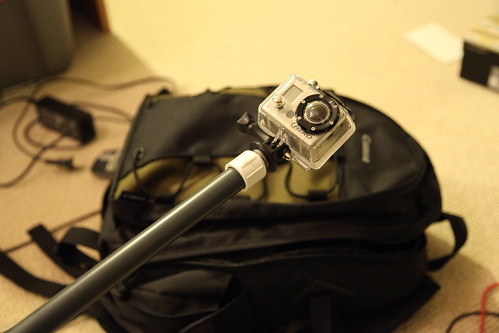
DIY $4 GoPro Monopod


IMG_0784IMG_0789IMG_0790IMG_0796IMG_0798

This upcoming weekend, I'm going for an epic snow kiting session in Lake Tahoe, CA. I wanted to capture different point of views while recording video; without breaking the bank. A quick trip to the local hardware store, and we have the super stiff, lightweight, easy to assemble, DIY $4 camera pole mount.

Bill of Materials (thanks McKenzie Wells for the H.D. links):
Tools Required:
  1. Drill and drill bit
Instructions:
  1. Drill the end cap, and screw the bolt through the hole
  2. Add washers to the end of the screw so the tripod mount will be tight
  3. Attach GoPro Tripod Mount
  4. Screw the end cap mount on the PVC riser
  5. Attach GoPro HD
  6. Record adrenaline pumping moments
Please check out the comments for some more tips.
Update: 1/27/2012

mattyb1018's Rubber Grip Mod:
You can add a rubber grip to your GoPro monopod by using a bicycle handlebar grip. Try your local bike shop. Thanks mattyb1018 for the tips!

Keolaw's Float Mod:
For surfers and water sporters, cutting a pool noodle to attach to the monopod works great to keep it afloat. Teflon tape can be used to seal the end caps. Thanks Keolaw for the tips! 

Sample video of the $4 monopod in action:

Feb 16, 2010

GoPRO HD Hero Memory Card Problems: Can't Record Video

(Photo: from GoPRO's website)

Update: 11/30/10
A firmware update from GoPro may fix the memory card problems in the GoPro HD Heros. There's also a bunch of cool features added in the update as well. Disclaimer: update at your own risk. http://www.goprocamera.com/support/hdheroupdate.php

Update: 12/15/10
Update from the comments--thanks Steve for the info. There may be some issues with the new firmware update. Please check out the comments section of http://cheesycam.com/gopro-hd-firmware-update/ for more information. I'm hoping the exposure issue is due to the user selecting Spot Metering vs. Center Weighted Average? If not, I would hold off upgrading until they make available the original firmware. Personally, I'm now using one of their recommended SD cards, and it's working good for now...knock on wood.


I'll cut straight to it, so here's the bottom line guys: GoPRO HD cameras have flawed firmware where they cannot read certain SDHC cards. Class 4, 6, 10, 30Mbit write speed, doesn't matter--the camera will just not play nice with many SDHC cards irregardless of the brand name. Either due to not enough testing, rushing to release the product to market, GoPRO still has not released a fix for this after 4 months+ of their product on the market. Also, nowhere on their website have they referenced this problem. Not cool. 

The only "fix" GoPRO has advised is to try a different card, but that kind of hurts if you already purchased a 32GB card setting you back an arm and a leg, which you could have used to go skiing for example. They are blaming it on the cards, but that is not the case because many of these cards have write speeds exceeding GoPRO HD's requirements. 

I've tested a 16GB Lexar Class 4 card, 8GB Adata Class 6 card, and I've only been able to successfully record 4 seconds of corrupted video, on the 16GB card, out of many many tries. The rest of the time, there is no video file recorded, and I get a S.O.S error with 3 beeps. However, I was able to record video on a 2GB Kingston Class 4 card.

For now, hopefully, users will report which cards do work with the GoPRO HD Hero so that other HD Hero owners will be able to capture their adrenaline pumping moments.


Update: Ongoing list of card that WORK:
http://www.facebook.com/topic.php?uid=50043151918&topic=11791