Aug 3, 2010

Firefox 3.6.X & Vmware SSL/https Fix


Thanks to Alan Doyle on the mozilla forums for this fix:
  1. Open up Firefox
  2. Type in the address bar: about:config
  3. Type in the filter bar: ssl2
  4. Double click on security.enable_ssl2 to change the value from False to True
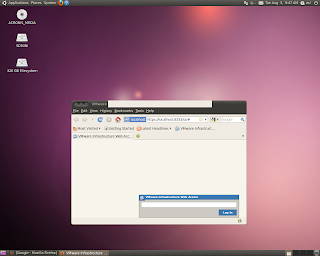
Now you should be able to log into https://localhost:8333
 
Vmware Console on the other hand will not work with Firefox 3.6.X. Therefore, if you're on Ubuntu 10.04 Lucid, you will need to access Vmware remotely via another computer on your network. If you're using anything below Ubuntu 9.10, then downgrade Firefox 3.6.X to 3.5.8, and Vmware Console will be okay.

Aug 2, 2010

Install Vmware Server 2.0.2 on Ubuntu 10.04 Lucid Lynx 64-bit

Attempting to install Vmware Server 2.0.2 on Lucid 64-bit will ultimately stop at the building modules step "Execution Aborted." To get around these errors, an excellent working guide can be followed at: hmontoliu's blog.

*Important notes*
Towards the end of the hmontoliu's guide, for my installation, I did not opt for the "-d" flag, which uses default selections for a Vmware Server installation, because I needed to enter in the:
  1. Administrative user name
  2. Networking options
  3. Serial number
Using the "-d" flag prevented me from specifying an administrative user name, so after my first installation attempt, I could not log into the installation.

Did not work for me:
"/usr/bin/vmware-config.pl -d"

Did work:
"/usr/bin/vmware-config.pl"

Hopefully, you'll now see:
"The configuration of VMware Server 2.0.2 build-203138 for Linux for this
running kernel completed successfully."

Now your server can be accessed at:
https://localhost:8333 or http://localhost:8222

I believe the latest Firefox may have some issues accessing a SSL'ed Vmware server, so try using the unsecured http link to see if that works for you.

Cheers
Jul 14, 2010

Google Chrome :: Task Manager Keyboard Shortcut


Once in awhile, a page may cause a hiccup in Google Chrome. If one of your pages refuses to close, a quick keyboard shortcut to kill the page is:

Shift + Esc

This will bring up the Google Chrome Task Manager. Select the tab you want to close, and then click End Process. Hopefully, all is well again.

Cheers

Jul 7, 2010

7/7/2010 :: 1and1 Email server is down...Yes, again

Yes, this is getting repetitive, but I'm going to post it anyway to keep track of 1and1's down time.

For the past few hours, their email service has been offline, which means you won't be able to send/receive mail. Maybe you'll be one of the lucky ones to receive, but you won't be able to send. Emails that you try to send may end up disappearing because their servers aren't working. You could try logging into their webmail.1and1.com, but it may be bogged down from the flood of users. Don't even try to call because you won't get through. (I've tried.)

If it's any consolation, email their billing dept at billing@1and1.com to respectfully complain and request a credit to your next billing cycle. They will give you a credit on your account.

Update 7/14/2010: You can check 1and1's server status at http://status.1and1.com Thank you mortalwombat for the info.

Jul 2, 2010

7/2/2010 :: 1and1 mail server problems

Hi folks, 1and1's email servers go haywire again. This is like the 4th time this year. I dreaded calling their technical support, but I had to because it looked like my client was missing email from 8AM-10AM. Guess what, another annoying 10 minutes dealing with 1and1 technical support. They confirmed their email servers were having issues and that their admins were "on it." Thumbs up to the admins though, I can imagine it being tough working at 1and1. I will contact their complaints department to get a credit for the next billing cycle. End rant.

BTW: On a funny note, while calling tech support, they were playing Portal's ending song Still Alive. Kind of odd calling into tech support and hearing the lyrics "dead, still alive, dying, burned," lol. Bravo to one cool admin out there.

May 20, 2010

Smart Car: Reset The Service Indicator

From Evilution.co.uk
http://www.youtube.com/watch?v=pkSY3G3JUOQ
This is the same for all smarts except the new Fortwo. (see extra info below).
Please do not contact me saying they don't work because they do if you do it right.
Just doing everything in the right order isn't enough, timing is very important.
It seems that there may be 2 derivatives to the reset so try both methods. 
Method 1
Switch on the ignition to position 1.
Select maintenance indicator within 4 sec by double tapping the instrument cluster button.
Switch of the ignition to position 0 (off) within 10 sec.
Push and hold in the instrument cluster button and switch ignition on.
Hold the instrument cluster button for another 10sec.
In that time, the spanner symbol on the LCD will flash and eventually reset.

Important Info
Please remember to get your car serviced properly, resetting the light doesn't
mean your car has been serviced and you won't fool anybody when you come to sell it.
I have only posted it here because there are a few unscrupulous rip off merchants
attempting to sell this info on EBay. Don't fund these cretins.

May 13, 2010

E*TRADE iPhone App :: Free Real-time Options Quotes


The E*TRADE iPhone App is a powerful stock App. Not only do we get free streaming stock quotes, but we also get free streaming options quotes too. The user interface is clear and concise. We can view option chains, in-the-money calls, real-time size for bid-ask, as well as the underlying stock price. It's fun to see your order change the bid-ask size.


For real time streaming stock quotes, the App allows us to add a stock watch list, so we can view our stock price, volume, and price direction update in real-time.

To get streaming real-time quotes, you'll need to sign up for an E*TRADE account. Signing up is free, and there are no hidden charges or fees. Try it out, use the App, and see if you like it. Cheers!