Oct 16, 2009

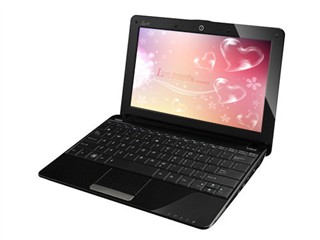
Intel GMA = The Suck, so I'm buying a Nvidia ION equipped Asus Eee PC 1201N

Ever try playing HD content on your laptop with an Intel GMA branded GPU? Annoyingly choppy, isn't it? Shh, say no more, say hello to the Nvidia ION GPU.

Two new Asus Eee PC netbook specs were leaked on eeepc.it, and then were quickly taken down, and it looks like one of them will be flexing some muscle with raw GPU power.

The Asus Eee PC 1201N and the Asus Eee PC 1201HA are slated for release, probably in the upcoming quarter, and I want one now. Alright, so what's the big deal between these two models? The 1201N comes with a Dual Core Intel N330 Atom and Nvidia ION and the 1201HA does not, so if you want to play those movies, HD content, HD Flash 10.1, and Physx powered games in your collection, get the 1201N.

I can see why Asus released a cheaper model with a slower Intel Atom 1.33 Ghz CPU and Intel GMA 500 chip, but cmon, a user would be sacrificing HD movies, games, and performance. I, for one, will be looking forward to the release of the 1201N.

Asus Eee PC 1201N Asus Eee PC 1201HA
12.1 " Display 12.1 " Display
Intel Dual 1.6Ghz N330 Atom Intel Single 1.33Ghz Z520 Atom
Nvidia ION 9400M Intel GMA 500
3GB DDR2 RAM 2GB DDR2 RAM
320GB HD 250GB HD
802.11b/g/n 802.11b/g/n
Bluetooth Bluetooth
6-cell 6-cell
Webcam Webcam
Windows 7 Home Premium Windows 7 Home Premium

Oct 15, 2009

1and1 Webmail Down: 500 Internal Server Error


Almost every other morning, 1and1's webmail interface takes a vacation--it just stops working either from too many users trying to access their webmail interface or from server problems on their site. A nice long call to 1and1 gets you an answer, "yes, our service is unavailable but please bear with us." Why should we bear with you every other day? We're paying for a service, and it's not being provided.

If enough of their users call them to complain, then maybe they'll do something about it. Give them a piece of your mind 1and1 clients.

Aug 18, 2009

Tutorial: Zotac ION N330 + Boxee/XBMC + VDPAU + 1080P w/sound over HDMI

*Update 12/01/09 - Instructions For BOXEE ONLY. Please refer to this post for XBMC.*

This post will get you video and audio over HDMI including audio passthrough for Dolby Digital or DTS. Feel free to skip down to the good stuff ; ).

The Zotac N330 is a dual core Atom CPU with an Nvidia ION GPU inside a tiny 7.5"x7.5" form factor. What's really amazing though is that when these two little chips are put together they are capable of playing 1080P HD content without even breaking a sweat. Through VDPAU for Linux, or Direct X 10 for Windows, content traditionally sent to the CPU is now sent to the ION to decode. This means for users like us, this opens the door to media, games, and powerful computing in a small, well priced, and low power consuming computer. Emphasis on powerful and well priced.

I ordered my board on Amazon w/free shipping for $190 including a 19V power supply--I assumed it would be a 12V power supply. After completing the installation, when playing 720P movies, my CPU usage was less than 6% per core! From what I've read, 1080P does NOT utilize the CPU core all that much either.

FYI: For those worried about getting an older board: the older revision of this board had a USB suspend problem, but now all the boards being sold have been fixed with an added jumper.

Here are my system specs:
Zotac N330
1GB DDR RAM
4GB OCZ Rally2 USB stick w/Ubuntu 8.10 Intrepid installed
Boxee w/latest build

These instructions are interchangeable with XBMC. Boxee is built on XBMC, so some of the references will look similar.

This will get you the latest NVIDIA graphics drivers:

Add these repositories to your sources:

deb http://ppa.launchpad.net/nvidia-vdpau/ppa/ubuntu intrepid main
deb-src http://ppa.launchpad.net/nvidia-vdpau/ppa/ubuntu intrepid main

Open up a terminal:
sudo apt-key adv --recv-keys --keyserver keyserver.ubuntu.com 71609D4D2F1518FA9C5DC0FB1DABDBB4CEC06767
sudo apt-get update
sudo apt-get install linux-headers-generic nvidia-glx-185
sudo reboot

Upon Rebooting go into the BIOS.
(the following instruction is from my memory, so if you dont' find it there, it's somewhere in your BIOS) In your BIOS, go to Southbridge configuration and change the video RAM from 256MB to 512MB. Inside the Southbridge config, change Audio codec to Internal only.

Go into boxee, Settings, Video:
Turn on accelerate videos when posssible to enable VDPAU.
Exit boxee.


This will get you sound over HDMI:
(not sure about coax or optical)

Boot into Ubuntu, and open up a terminal and type:
sudo gedit ~/.asoundrc


Paste the following into that file:
pcm.dmixer {
type dmix
ipc_key 1024
ipc_key_add_uid false
ipc_perm 0660
slave {
pcm "hw:0,3"
rate 48000
channels 2
period_time 0
period_size 1024
buffer_time 0
buffer_size 4096
}
}
pcm.!default {
type plug
slave.pcm "dmixer"
}

Open up another terminal (this will enable Youtube, and XBMC system sounds):
Type in: alsamixer
Make sure that IEC958 is unmuted by pressing the letter "m" without quotes.
If it it muted, then it will look like this - Item: IEC958 [off]
Once you unmute it, then it will look like this - Item: IEC958


Save. Close it. Reboot.


Inside Boxee:
Go to Settings, System, Audio and change the following:

Instead of:
sound: ie958
passthrough: ie958

Change to (type default to where ie958 is):
sound: default
passthrough: default

Now you will have HD video and sound in Ubuntu to Boxee from your HD videos all the way to youtube, hulu, or whatever you want to play. Now go have fun!

Jul 22, 2009

Ruger Mark III Guide - Field stripping, Upgading, Cleaning, and Tips

Before attempting any work on your firearm, please make sure your firearm is unloaded and safe to work on. The following information has been compiled to help Mark III owners find information in one place.

All content was made by their respective owners. Props goes out to these guys.

Tutorials in this thread:
I. Field Strip
II. Volquartsen Accurizing Kit Installation
III. FTE/Stovepipe Problem/Solutions
IV. Volquartsen Extractor Installation
V. Personal Experiences
VI. Magazine Safety Removal Mod (updated)
VII. Cleaning
VIII. Ultimate Cliploader
IX. Places to purchase parts


I. Fieldstrip Videos:
Field stripping the Mark III by OrbitalMechanics
1. Stripdown:
http://www.youtube.com/watch?v=0Id7xcRoIvE

2. Reassemble:
http://www.youtube.com/watch?v=O4nVX2FlBHY


Before firing the first round:
I would recommend a field strip and a good cleaning of your new Ruger before first use. During my first cleaning, there were tiny metal jibs, from production, in places where they should not have been. Plus, field stripping, cleaning, and oiling is fun with the right tools and knowledge.


II. Volquartsen Accurizing Kit Installation:
http://videos.volquartsen.com/MKIII%...stallation.mov

Instructions and Pictures to Detail Strip Mark III (Use this guide to install VQ parts and accurizing kit)
http://www.guntalk-online.com/detailstrip.htm


III. FTE/Stovepipe Problem/Solutions
If your gun is having problems, then here's all you need to know:
http://www.rugerforum.com/phpBB/viewtopic.php?t=58358


IV. Volquartsen Extractor Installation:
http://www.guntalk-online.com/detailstrip.htm#extractor


V. Personal experience from installing parts:
The accurizing kit feels smooth as slicing through butter once installed. 2.25 pound trigger pull. If I were to do the install of the Accurizing Kit again, I would have purchased the Accurizing Kit and Titanium Disconnector and installed them all in one detail strip. I will be purchasing the Disconnector soon, so I will have to do another detail strip of the trigger components.

The overall kit installation was not that bad. The internal parts removal was okay, but the trigger removal and parts installation were a challenge. There are a few steps I got snagged on. I'll try and clarify to make it easier for you.

If you refer to the guntalk pictures: http://www.guntalk-online.com/detailstrip.htm

Internal frame Removal Step #5 - Safety lever - Yes, use caution when removing, or you may lose the tiny ball and/or spring.

Internal frame Installation Step #5 - Sear/Safety lever - The sear MUST be pushed up into the groove on the safety lever. While putting pressure on the sear in the up position, place the sear into the groove on the safety lever.

Trigger removal Step #1 - If you watched VQ video on this one, don't use a hammer! The trigger pivot pin is held by a thick wire/spring, which holds it in place. This is that one wire that goes alongside the frame. You'll need to apply pressure by pushing this spring down with either an allen wrench or the end of a plastic pen (be careful while applying pressure to not scratch the frame). The pressure will allow just enough space so that the pin can freely move. So while applying pressure, you can now pull the pin out.

The VQ edge extractor can be installed any time with your standard field strip, and is relatively easy to install.


VI. Magazine safety removal (bottom of the page):
http://www.guntalk-online.com/forum/viewtopic.php?t=387

After reading the post by ruger22, all you need to do this mod are 2 stainless metric M5 washers, and 1 SAE #10. The washers may be a tight fit, so dremel the center out, polish, and you're all done. No cutting needed. ruger22's method is very efficient.


VII. Cleaning your .22:
From the late and great Donald C. Nygord:
http://www.nygord-precision.com/cleaning.html
I use Hoppes.


VIII. The Ultimate Cliploader:
This tool will load your magazine in under 5 seconds flat:
Video by JaonsShooter: http://www.youtube.com/watch?v=65jHazxWXCA


IX. Places to purchase parts for your Mark III:
http://www.midwayusa.com
https://www.volquartsen.com/category...es/4-mkiimkiii

VQ Black Accurizing Kit:
http://www.midwayusa.com/viewproduct...tnumber=261502
https://www.volquartsen.com/products...er-mkiii-black

(The difference between the black vs. silver is that the black kit has a black extended bolt release vs. the silver kit has a silver extended bolt release.)

VQ Silver/Stainless Accurizing Kit:
http://www.midwayusa.com/viewproduct...tnumber=319266
https://www.volquartsen.com/products...or-ruger-mkiii

FTE/Stovepipes problems? (VQ Exact Edge Extractor):
http://www.midwayusa.com/viewproduct...tnumber=363360

VQ Titanium Disconnector:
https://www.volquartsen.com/products...m-disconnector

Ultimate Cliploader:
http://www.ebay.com
http://www.cheaperthandirt.com/GNS127-1.html

Be safe, and enjoy your Ruger!

Jun 25, 2009

How to: Add persistent route in Windows 2000 Professional

Go to command prompt
This will permanently route IP address 192.168.0.248 to gateway 192.168.100.1
route -p add 192.168.0.248 192.168.100.1

Jun 22, 2009

How to Fix: Google Chrome "Resolving Host" Problem

Google Chrome loads fast, is an excellent browser, but every now and then, I get a "Resolving Host" problem where my Internet access stops working. The browser just sits there and nothing happens.

Fix:
  1. Go into the top right of Chrome and click the Wrench Icon
  2. Go to Options
  3. Click on the Under the hood tab
  4. Check OFF "Use DNS pre-fetching to improve page load performance"
  5. Restart Chrome or Windows

May 20, 2009

Shorewall Firewall Configuration for a Single Host

If your goal is to firewall a single computer connected to the net, then these are the shorewall configurations to get the job done. We'll be using Webmin to configure our settings. Let's get to it!

Log into webmin, go into manual configuration (for each category listed below), and copy and paste these settings.

#Network Zones
#ZONE TYPE OPTIONS IN OUT
# OPTIONS OPTIONS
fw firewall
net ipv4

#Network Interfaces
#ZONE INTERFACE BROADCAST OPTIONS
net eth0 detect

#Default Policies
#SOURCE ZONE DESTINATION ZONE POLICY LOG LEVEL LIMIT:BURST
$FW net ACCEPT
net all DROP info
all all REJECT info

#Firewall Rules
#ACTION SOURCE DESTINATION PROTOCOL SOURCE PORTS
#DESTINATION PORTS
#The following line will enable FTP port 21 to work with PASV connections #connecting to port 30000 through 30100
ACCEPT:ULOG net fw tcp 21,30000:30100
#The following line will enable a VMware server machine to connect to our
#Vmware image via port 20000
ACCEPT:ULOG net:IPofVMwareHostgoeshere fw tcp 20000

#Blacklist Hosts
#Add IP addresses in this format
XXX.XXX.XXX.XXX/XX

Lastly, restart shorewall

If you'd like to block an entire country's IP addresses, the best place to go is www.blockacountry.com This site will list a country's IP address block assignments. They made it super easy for us to block an entire country! Throw some support, aka donations, if you do decide to use it.
.