

Feb 17, 2010
Fixed: Can't map a network drive in Vista Home & Samba
We had a Vista Home client machine that needed access to a Samba 2.X server. The problem though is that Vista ships with NTLMv2 authentication ONLY as default when we want just NTLM AND NTLMv2 authentication.
There is no Local Security Policy editor in Vista Home, nor can you access it by typing secpol.msc, so we're going to need to edit this via the registry:
1. Open up regedit
2. Go to HKEY_LOCAL_MACHINE\SYSTEM\CurrentControlSet\Control\Lsa\LMCompatibilityLevel
3. Change the Value from 3 to 1
4. Reboot
5. Map your drive
Feb 16, 2010
GoPRO HD Hero Memory Card Problems: Can't Record Video

(Photo: from GoPRO's website)
Update: 11/30/10
A firmware update from GoPro may fix the memory card problems in the GoPro HD Heros. There's also a bunch of cool features added in the update as well. Disclaimer: update at your own risk. http://www.goprocamera.com/support/hdheroupdate.php
Update: 12/15/10
Update from the comments--thanks Steve for the info. There may be some issues with the new firmware update. Please check out the comments section of http://cheesycam.com/gopro-hd-firmware-update/ for more information. I'm hoping the exposure issue is due to the user selecting Spot Metering vs. Center Weighted Average? If not, I would hold off upgrading until they make available the original firmware. Personally, I'm now using one of their recommended SD cards, and it's working good for now...knock on wood.
I'll cut straight to it, so here's the bottom line guys: GoPRO HD cameras have flawed firmware where they cannot read certain SDHC cards. Class 4, 6, 10, 30Mbit write speed, doesn't matter--the camera will just not play nice with many SDHC cards irregardless of the brand name. Either due to not enough testing, rushing to release the product to market, GoPRO still has not released a fix for this after 4 months+ of their product on the market. Also, nowhere on their website have they referenced this problem. Not cool.
The only "fix" GoPRO has advised is to try a different card, but that kind of hurts if you already purchased a 32GB card setting you back an arm and a leg, which you could have used to go skiing for example. They are blaming it on the cards, but that is not the case because many of these cards have write speeds exceeding GoPRO HD's requirements.
http://www.sportbikes.net/forums/open-forums/427173-video-editing-1080p-go-pro-choppy-need-solution.html
http://www.kawiforums.com/off-topic-discussion/146750-gopro-hd-issues.html
I've tested a 16GB Lexar Class 4 card, 8GB Adata Class 6 card, and I've only been able to successfully record 4 seconds of corrupted video, on the 16GB card, out of many many tries. The rest of the time, there is no video file recorded, and I get a S.O.S error with 3 beeps. However, I was able to record video on a 2GB Kingston Class 4 card.
For now, hopefully, users will report which cards do work with the GoPRO HD Hero so that other HD Hero owners will be able to capture their adrenaline pumping moments.
Update: Ongoing list of card that WORK:
http://www.facebook.com/topic.php?uid=50043151918&topic=11791
http://www.facebook.com/topic.php?uid=50043151918&topic=11791
More on the topic here:
http://goprouser.freeforums.org (thanks anonymous)
http://www.facebook.com/topic.php?uid=50043151918&topic=10838
http://goprouser.freeforums.org (thanks anonymous)
http://www.facebook.com/topic.php?uid=50043151918&topic=10838
http://www.hayabusa.org/forum/random-thoughts/122158-gopro-hd.html
http://forums.mtbr.com/showthread.php?t=581680
http://forums.mtbr.com/showthread.php?t=581680
http://www.sportbikes.net/forums/open-forums/427173-video-editing-1080p-go-pro-choppy-need-solution.html
http://www.kawiforums.com/off-topic-discussion/146750-gopro-hd-issues.html
Feb 11, 2010
The Tablet of the Future, Now
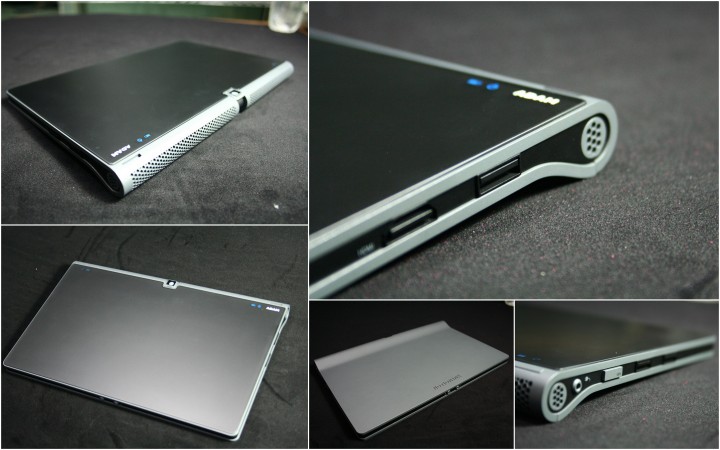
Notion Ink Adam (displayed above), JooJoo, Dell Mini 5, HP Slate, Lenovo U1, Archos 9 are just some of the names out there other than the iPad, and these tablets are the tablets to get excited about. The iPad release was a major buzz kill because it just looked like an oversized iPod Touch with eBooks and productivity suite. I want something revolutionary, not evolutionary.
The tablet I will purchase must have the following:
Input
Connecting external devices to the tablet such as a Camera, Camcorder, USB stick, SD card, Webcam, etc. We have devices that do what they do best, and these devices should be able to interact with our tablet, so maybe a mini USB input/output would be an elegant solution.
Flash Support
When I browse the Internet, I want to be able to watch flash movies on the fly by clicking within a webpage. The movie plays, then finishes, and I'm back to my browsing. Seamless. The tablet must be able to play HD Flash movies as well because content created by consumers is now converging in that direction. We have camcorders that come standard shooting at 1080p.
App Store
Standardization of apps is what made the Apple Store so successful. It connected developers, content providers, and consumers in one easy to use place. Android Marketplace may be the next great thing.
Camera/HD Camcorder

Feb 7, 2010
Changing spark plugs on a Scion xB :: HD
Guide:
0:00 Materials
0:22 Removing the cover
0:41 Removing coil packs
1:18 Removing the spark plug
1:35 Using a gapper tool to check the gap
2:20 Adding antiseize
2:40 Screw in new spark plug and torque it down
3:27 Fast forward through the rest
Tools & Materials:
4 Spark Plugs
5/8" or 16mm socket with rubber insert
10mm socket
Socket extension
Antiseize
Spark plug gapper
Disclaimer: Demonstration purposes only. Please use safety precautions whenever working on a vehicle. Do it at your own risk.
Jan 31, 2010
TomTom Navigator 6 for Treo 680P 755P Fix
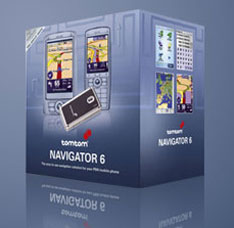
I received the following errors: "Your device is incompatible with TOMTOM Navigator"
And another error: TomTom was not found Card Eject
To fix both of these problems:
1. For 2GB and less, format your card FAT with 32KB, for 4GB or more format your card with FAT32 with 64KB allocation unit size
(put your card in a Card reader, copy all the contents to a safe location on your C: drive, then right click in windows, click format *FORMATTING WILL ERASE EVERYTHING ON THE CARD, SO BACKUP FIRST)
2. Download this update from Palm for the 680P and 755P http://rapidshare.com/files/344046141/TomTomNAV6_680n755Update.zip
3. Copy the contents into your TomTom folder on your SD card. TomTom should then load
Happy GPS'ing
Jan 13, 2010
CES 2010: Sayonara Hotel TV. Hello Boxee Beta.


Earlier in Day 2 of CES, I saw a Boxee Beta live demonstration powered by D-Link Boxee Box, and thought to myself, finally, Boxee Beta is here. The user interface was completely revamped with new features such as movie cover thumbnails, a Boxee Browser, hardware acceleration, Adobe Flash 10.1 compatibility, sexier icons, and intuitive navigation control. Excellent.
I packed my Nvidia ION powered HTPC on the flight down to Las Vegas to handle my computing needs--I needed to view, edit, and upload photos with Adobe Bridge, Photoshop, and FlickrSync. I did not bring a monitor because the LCD TV at the hotel would have a HDMI input, so all I needed to bring was a wireless keyboard, power adapter, and HDMI cable for a fully functional MTPC - Mobile Theater PC.
Now fast forward. It's the end of the day, my feet and back are sore from all the walking, and I want to sit back and relax. I hooked up the HDMI connector and plugged in my box. Then, I connected to their wireless and installed Boxee Beta for Windows 7. Next thing you know, I've sunken into bed while eating a late-night snack, and getting some laughs with Stephen Colbert streaming over WiFi. Great way to end CES 2010.
Subscribe to:
Posts (Atom)